

qBittorrent Portable, a major update to the open-source BitTorrent client that includes numerous new features and improvements for all supported systems, including Windows, Linux, and macOS, was released today.
One year after has new features like the Torrent Creator button in the toolbar, a unique “Tracker status” filter, a “Created On” column to transfer the list, the ability to set torrent share limits per category, and support for asynchronously calculating torrent pieces.
Furthermore, it provides the ability to customize the app’s style and color scheme on all compatible platforms, disable torrent state colors, replicate the content paths of specific torrents, and reboot when downloads are complete.
User Interface:
Remote control is possible with a safe web user interface. The client supports IPv6 and Unicode and is available in roughly 70 languages. Transfer management for larger downloads or shared files.
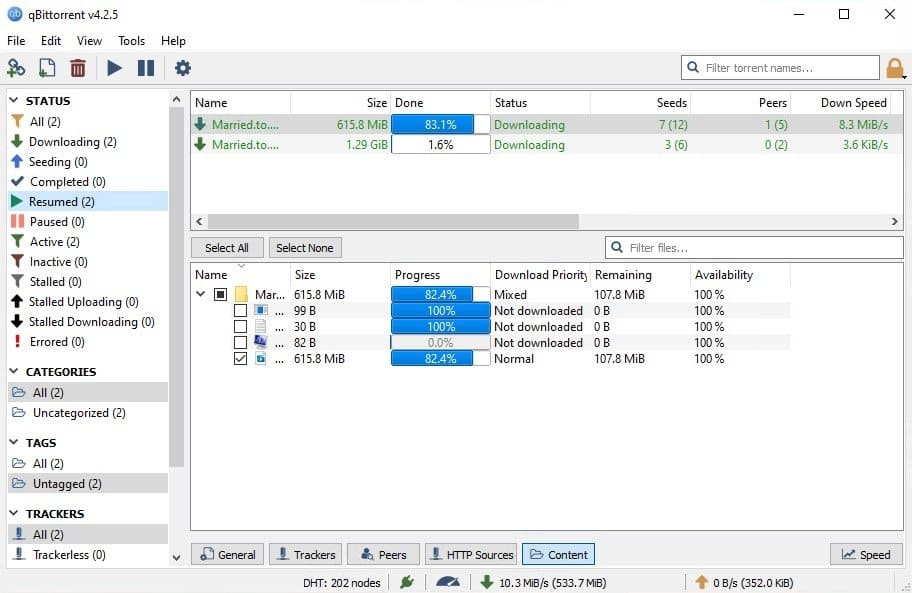
With an appealing user interface, an integrated search feature, and a Web UI for remote operation, qBittorrent is an advanced, cross-platform BitTorrent client.
What’s New:
- qBittorrent was made available on May 3, 2026.
- This is a major version release with a massive changelog accumulated over months of development.
- If you use qBittorrent as the download client behind Radarr, Sonarr, and Jellyfin, these are all the changes and items you should be aware of before upgrading.
Features:
- An open-source desktop client for BitTorrent and magnet-link transfer management forms the basis of qBittorrent.
- The primary objective of this BitTorrent client is to offer a substitute for similar torrent managers now in use.
- µTorrent-like user interfaces (for a seamless transfer) are the main features.
- Transfer management for larger downloads or shared files.
- The queue, progress, and connection controls are set by the client.
- Bandwidth and folder settings for regular use.
- Advantageous for the distribution of media, data, and approved software.
Release Notes of qBittorrent for macOS
- setComment endpoint for comments on torrents app/process Endpoint information with the launch_time field
- Declare that the sync data now includes statistics.
- Details on optional files in torrent list responses
- Using API keys for authentication: New features for API key authentication in addition to session cookies
- Permanent cookies are taking the role of session-only cookies.
- The session cookie’s name now includes the port.
- Better error messages when required parameters are absent
- 204 mistakes in the absence of data
- Metadata is now present in the /app/getDirectoryContent response.
- No error is reported when a category is edited without any changes.
How to Use?
- Downloading multiple torrents simultaneously
- An integrated torrent search engine
- Integrated RSS feed reader and downloader
- Successful internationalization
- µTP, DHT, PeX, LSD, UPnP, NAT-PMP, and encryption
- Extremely light cross-platform
- Prioritizing and queuing torrents
- Control over the files in a torrent (filtering, prioritizing)
- Excellent µTorrent-like user interface with Qt toolkit
- IP filtering (PeerGuardian or eMule files)
- Peer display with nation resolution and hostname
- Improved control over torrent trackers
- The closest open-source alternative to µTorrent
- A torrent creation tool
- Remote control using a secure online user interface
System Requirements:
Windows: 64-bit only; Windows 10 or 11 are officially supported. (Note: Older 32-bit systems or Windows 7/8 are limited to legacy versions like v4.4.x or v4.5.x.)
macOS: Compatible with recent macOS versions (requires the x64 or ARM64 architecture depending on your Mac).
Linux/Unix: Compiles on most Unix-like systems (Ubuntu, Debian, Fedora, Arch, BSD, etc.). [1, 2, 3, 4, 5]
Installation and configuration
- Download the installation from fcportables.net or the official website.
- Run the installer and select installation or portable mode.
- Complete setup by following the on-screen instructions.
- It will prompt you to choose scan settings and deliver a brief cleaning lesson after installation.
- Its first-time wizard lets customers configure settings for maximum efficiency right away.
Click to download qBittorrent Portable now.
qBittorrent Portable for Mac can be downloaded immediately from its homepage. Get it now!


