

Blender Portable is a free and open-source 3D modeling tool. If you’ve just started in animated films, visual effects, art, 3D-printed models, motion graphics, interactive 3D apps, virtual reality, or computer games, you’ve probably heard of the software. Because it is free, you will not have to worry about funding your learning period while you learn to use the software.
Blender gained enough knowledge to become an advanced user; you can use Python scripting to customize the application and create specialized tools. It regularly includes them in its update releases.
User Interface:
Blender’s ability to completely customize your layout will appeal to both new and experienced users. Blender can handle anything from splitting its view to completely changing it using Python scripting.
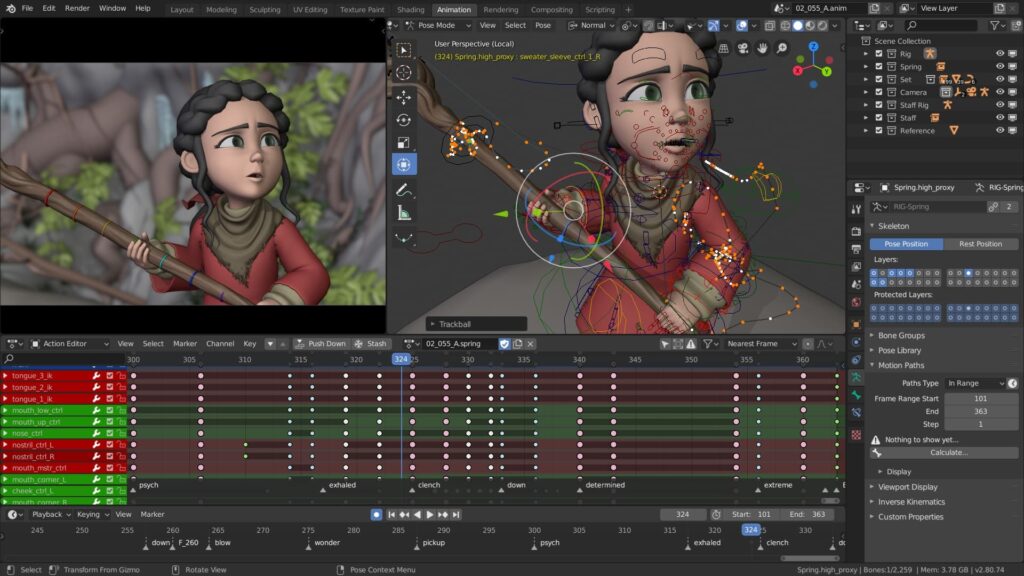
The Blender interface also offers the following:
Consistency across all platforms.
There are no disruptive pop-up windows.
Crisp text and support for high-dpi/retina monitors.
What’s New:
- SDFs, volumes, and new GN-based modifiers enable procedural work that goes beyond “scatter some rocks.”
- Boolean-style workflows are clearer, environment work is faster, and you can push a lot more complexity before it breaks.
- When lighting fog, skin, glass, or anything glossy, you’ll notice higher volumes, thinner film effects on metals, and SSS.
- It appears to be a modern renderer catching up with film and gaming pip.
Features
Hover to Copy/Paste.
This is the best of them all; if you read nothing else, read this one! If you mouse over a number or color and then hit CTRL+C, the value will be copied.
Random Node.
The random node is the output of the “Object Info” node in the “Input” folder. The random node provides endless options. In the example, I connected the random output to a color ramp node that had three colors.
Progressive refining.
I never returned after learning about gradual refining. This little checkbox may be found on the “Performance” tab of the “Render” panel. If you check it, instead of rendering each tile, you get a whole image.
Transparent background.
I regularly require a render with a translucent background. There are several ways to accomplish this. But this method only requires one click. Under the film tab, there is a checkbox labeled, you guessed it! Check the “transparent” box to replace the sky with transparency in all of your renders.
Matcaps
Matcaps are perfect for sculpting and showing meshes in a render-like preview. To use them, press N to open the properties panel, then scroll down to the “shading” tab and choose which will display a list of 24 different Matcaps.
Release Notes of Blender Portable:
- The Blender Foundation publishes official stable versions regularly.
- The current release schedule strives to provide frequent and reliable releases.
- Every version that has been released is available for download.
- However, for general use and production, it is recommended that you always use the most recent stable release.
System Requirements:
- Operating System: 64-bit Windows 8.1/10/11, macOS 11.2 (or Apple Silicon), or Linux (glibc 2.28+)
- Processor (CPU): 64-bit quad-core processor with SSE4.2 support
- Memory (RAM): 8 GB
- Graphics (GPU): 2 GB VRAM, supporting OpenGL 4.3 or Vulkan 1.3
- Input: 3-button mouse, trackpad, or pen tablet
How to Use?
- Blender is versatile; there’s something for video editors as well.
- Aside from producing spectacular effects for your projects, it has a built-in video sequence editor that allows you to perform basic editing operations such as cuts, splicing, masking, and color grading.
- The display choices include a live preview, luma waveform, chroma vectorscope, and histogram.
- Audio mixing, synchronization, scrubbing, and waveform display.
- There are up to 32 spaces available for storing video, images, audio, scenery, masks, and effects.
- Speed control, adjustment layers, transitions, keyframes, filters, and a lot more!
Installation and configuration
- Download the installation from fcportables.net or the official website.
- Run the installer and select installation or portable mode.
- Complete setup by following the on-screen instructions.
- It will prompt you to choose scan settings and deliver a brief cleaning lesson after installation.
- Its first-time wizard lets customers configure settings for maximum efficiency right away.
Click to download Blender Full Window Portable now.
Blender Full Portable for Windows can be downloaded immediately from its homepage. Get it now!


