

Pazu StreamGet Portable is a Windows/macOS desktop application that keeps a local copy of titles that you have authorization to watch on major streaming services for personal offline viewing. Sign in to your own account using the built-in browser and save the title as an MP4 or MKV file.
Pazu StreamGet’s official product page now lists 12+ supported services (up from 7 before), including Netflix, Disney+, Prime Video, Hulu, Max, Apple TV+, and Paramount+, as well as newer additions like Twitter/X, Facebook, TikTok, and Instagram.
User Interface:
The Pazu StreamGet desktop app’s UI was evaluated in 2026. Windows and Mac, Netflix, Disney+, Amazon Prime Video, Hulu, Max, and Apple TV+
You can also try these links:
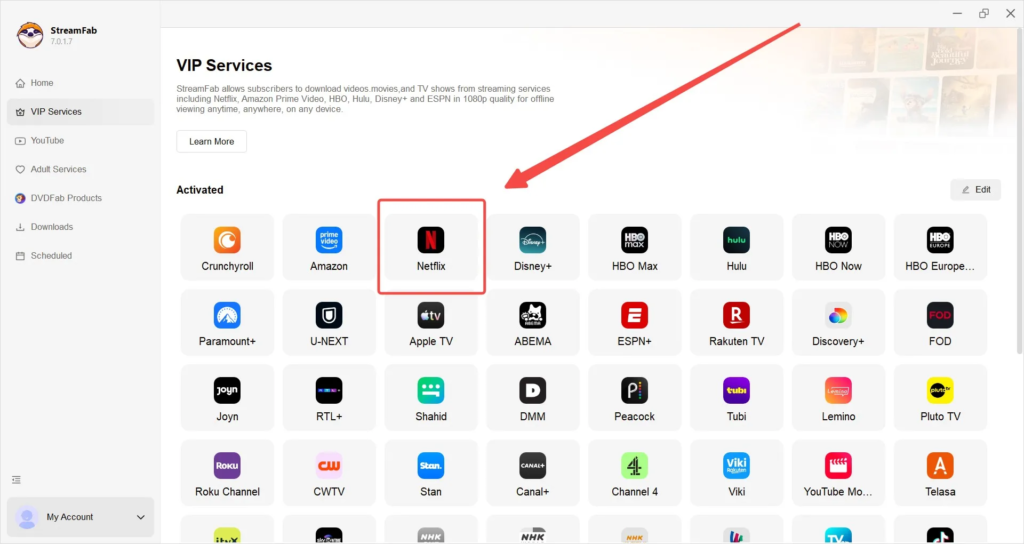
- Open Pazu’s built-in browser and log in to your streaming account.
- Search within the app and select the title (or paste the URL).
- Choose your preferred quality (up to 1080p if the title allows), audio tracks, and subtitle languages.
- Download a single title or queue the complete season for batch processing.
What’s New:
- Increased media processing performance and reliability.
- Improved multimedia management capabilities.
- Enhanced workflow efficiency and content management.
- Refined user interface and usability improvements
- Enhanced support for contemporary multimedia technologies.
- Improved compatibility with Windows 10 and 11.
- General bug fixes and stability enhancements.
Features
Wide Platform Support:
Pazu StreamGet works with over a dozen major platforms, including Netflix, Hulu, Max, Apple TV+, and Amazon Prime Video, as well as social media sites like Twitter/X and TikTok.
High Quality Resolution:
Downloads videos in HD up to 1080p and supports audio formats like Dolby Atmos and 5.1 surround sound (depending on the source platform).
Audio & Subtitle Customization:
Allows you to freely choose and save appropriate multilingual audio tracks and subtitle formats.
There are no expiration dates:
Local files are free of platform DRM, allowing them to be shared and played on any device (including PCs, Macs, and televisions) without the need for approved streaming software.
Release Notes of Pazu StreamGet Portable:
- Pazu StreamGet version supports the ARM64 architecture, which improves program performance. For Mac M series PCs, download and install the ARM version from the official website.
- Optimize the slow UI showing of registration information.
- Resolve the issue with Netflix videos failing to download subtitles.
- Resolve the issue of limited access to select TV series episodes on hulu.jp.
- Resolve the issue with subtitles not downloading in some hulu.jp videos.
System Requirements:
- Operating System: Windows 7, Windows 8, Windows 10, or Windows 11.
- Processor: 1 GHz processor or higher.
- RAM: 1GB RAM minimum (4GB or more is recommended).
- Hard Disk Space: At least 200MB of free space for software installation, plus extra space for your downloaded videos.
How to Use?
Launch and Login:
Open the Pazu application. You’ll notice a web browser and icons for various streaming providers (including Netflix, Amazon Prime, Disney+, and Hulu). Select your selected service and log in to your account.
Find Your Video:
Browse the built-in browser, search for the desired movie or TV show, and then click to start it. Alternatively, you can paste the video’s direct URL from your regular web browser into Pazu’s search box.
Configure Settings:
When the video loads, a popup window appears.
Download:
Click the Download button to start downloading right away, or Add to Queue to save multiple episodes or movies for later.
Access Files:
Once the download is complete, go to the History or Output tab and locate your DRM-free MP4 or MKV files for offline watching.
Click to download Pazu StreamGet Full Window Portable now.
Pazu StreamGet 2026 Full Portable for Windows can be downloaded immediately from its homepage. Get it now!


