

Google Chrome Updater 2026 (x64) Multilingual + Portable
Download Google Chrome Portable 2026 v151.0.7922.138 Latest Version For Windows. Chrome Updater (PorChromeUpd) is a Microsoft Windows application for downloading and updating portable versions of Google Chrome. Chrome Portable Updater downloads the proper portable version of Google Chrome for the Windows interface language.
Google does not really provide portable versions of the Google Chrome web browser for download. Chromium, the browser that runs Google Chrome, is available in portable format.
It is possible to run Google Chrome as a portable version, but updating is challenging since there are few tools for automating the update process. Chromium users, on the other hand, may choose from a number of automatic Chromium update options.
Google claims to have “turned the existing process boundary into a jail.” There is one exception to this rule: browser plugins such as Adobe Flash Player do not work within the tab jail, leaving users vulnerable to cross-browser attacks until plugins are updated to match Chrome’s new security standards. Google has also developed a new phishing blacklist that will be integrated into Chrome and made available via a separate public API.
All you need to do is the following:
- Download Chrome Portable Updater from the fcportables.net website.
- Extract the downloaded archive into your machine.
- The application extracts the portable Chrome versions into directories in the root structure. You may wish to relocate the folder to its intended location.
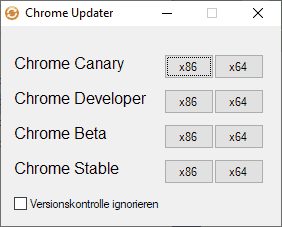
- There are two executable files in the root directory (sadly, with German names).
- Chrome Updater x86-x64 Lang_EN Einzel Ordner.exe extracts the specified Chrome channel version into its own folder, such as Chrome Dev x64. You may use it to create up to 8 distinct Chrome portable folders and run them separately (ideal for testing).
- Chrome Updater x86-x64 Lang_EN Nur Chrome Ordner.exe extracts the specified channel version into the Chrome folder, replacing any existing versions.
- In other words, if you want to utilize several Chrome versions, run the executable specified in 4.1; if you just want one Chrome edition, use the exe in 4.2 instead.
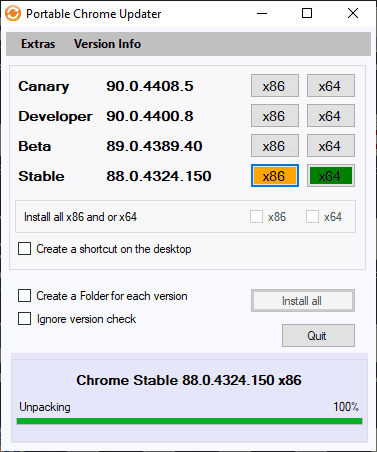
- The program includes download links for all Chrome channels and Windows architectures.
- Choose your preferred option and wait for the download to finish.
Passwords Not Saved Between PCs By Default: Google Chrome saves passwords in an encrypted format that is connected to the current PC. Passwords are not kept or stored on the PC; they cannot be recovered when you move to a new one. However, we have included password portability as an advanced option that may be activated by reading the help.html file.
Certificates Not Portable: Google Chrome does not include a certificate manager. It uses Windows’ certificate manager. As a consequence, any certificates installed using the Google Chrome interface are only stored on the current local machine and will not go with you. As a consequence, you should avoid using private certificates with Google Chrome except on your own computer.
Some Settings/Extensions Locked Per PC: Google Chrome limits some settings to a certain computer. Details are available in this thread. The Chrome developers purposefully created this behavior. If you want this changed, please register a problem with the Chrome developers. To circumvent, log in to Google and restore all settings and extensions, then use an extension like Session Buddy to save session data while switching PCs. It is crucial to remember that FC Portables has not reviewed this add-on.
Other portable browsers, such as Mozilla Firefox, Portable Edition, lack the aforementioned shortcomings. These vulnerabilities are specific to Chrome’s design and cannot be exploited without Chrome engineers updating the source code.
Some Features:
- A faster way to achieve practically anything.
- Google Smarts: Everything You Want to Do
- Chrome security is your web surfing superpower!
- Go anywhere, do anything.
- Create application shortcuts to your favorite websites.
- Synchronize bookmarks across browsers.
- Task Manager for Chrome Browser
- Check Memory Usage by Various Browsers
- Chrome’s “Pin tab” functionality
To access more free software on this page, go to: FCPortables
You can also download the following related programs:
Portable Features:
- No installation is required.
- No administrator rights are required.
- Pre-activated
- Online enabled.
- Now supports dark mode.
- Sandbox folder holding updated settings; delete to reset.
- Run it and enjoy!


