

With Syncovery Premium Portable, you may manually set up as many jobs as you need or use the scheduler. Syncovery supports FTP, SSH, HTTP, WebDAV, Amazon S3, Google Drive, Microsoft Azure, OneDrive, SharePoint, Dropbox, Box, and many other cloud storage providers in addition to network devices, local hard drives, and other mounted volumes.
Syncovery Premium’s additional choices include ZIP compression and data encryption. On Windows, the scheduler can operate as a service without requiring users to log in. “Exact Mirror” and “Standard Copying” are good synchronization choices.
Syncovery Premium has an attractive graphical user interface and is a very versatile synchronization and backup tool. The wide range of features is user-friendly and meets the needs of all users.
User Interface:
This software’s graphical user interface (GUI) offers two modes: a basic Wizard Mode for beginners and an Advanced Mode for IT professionals.
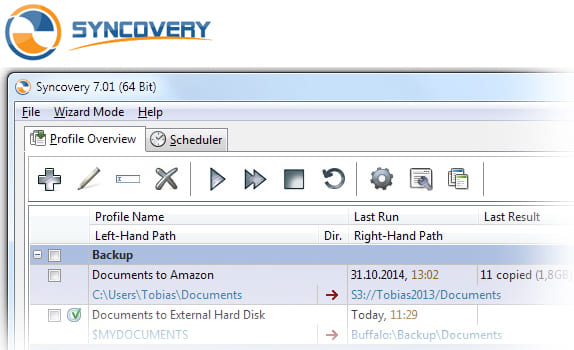
It centers on a “Profile Overview” interface where you can manage backup processes, check last and future runtimes,, and track real-time progress.
What’s New:
- Simple instructions and an intuitive user interface.
- Support for a variety of storage media, cloud services, and backup techniques.
- Data encryption and safe storage of all passwords and credentials.
- The capacity to plan and carry out automatic backups.
- Technical support and comprehensive documentation are available.
Features:
Versatile File Synchronization Across Various Storage Locations: Syncovery Premium functionality allows users to synchronize data between FTP/SFTP servers, local hard drives, network devices, USB drives, and cloud storage services.
Complete Backup Options: This feature allows users to make full backups of their data, including incremental, differential, and full backups.
Strong File Versioning for Data Recovery and Change Tracking: The Syncovery Premium feature provides strong file versioning for data recovery and change tracking while automatically saving several versions of the updated files.
Support for Numerous Cloud Storage Protocols and Services: Includes support for numerous cloud storage providers, such as Dropbox, Microsoft OneDrive, Amazon S3, and OpenAI Drive. It also offers a very adaptable way to interface with various cloud storage providers while preserving safe authentication.
Support for FTP/SFTP Secure File Transfers: Users can send files via FTP/SFTP protocols with complete security settings by offering FTP/SFTP support for secure file transfers.
Release Notes of Syncovery Premium Portable:
- A makeover has been made to the profile editor dialog.
- There has been a revamp of the Internet Protocol Settings dialog.
- The updated Exact Mirror configuration interface now includes new functionality for high availability server replication.
- New Account Manager for Cloud/Internet Protocol Accounts (see File menu or Internet dialog)
- The new File Integrity Scanner may be found under Verifications->Profile Integrity.
- Cloud-to-cloud replication without requiring temporary local data
- Different versioning folders can be set on the left and right sides thanks to an improved algorithm for identifying renamed and relocated folders.
- As part of the Syncovery Remote Service, incorporate an SFTP server for peer-to-peer synchronization.
- The context menu in the Profile Overview allows you to choose a color for each profile.
How to Use?
- Synchronizes or backs up files
- It is possible to copy several files at once.
- Includes a scheduler for internet and cloud support.
- Support for compression and encryption.
- Locates files that have been transferred.
- Clever tracking.
- Mirror Mode Precise.
- Unattended mode.
- Make copies of locked files.
- File masks and filters.
- It is easy to resume on a full disk.
System Requirements:
- Supported OS: Windows 11, Windows 10, Windows 8.1, Windows 7
- RAM (Memory): 2 GB RAM (4 GB recommended)
- Free Hard Disk Space: 200 MB or more
Click to download Syncovery Premium Portable now.
Syncovery Premium 2026 Full Portable can be downloaded immediately from its homepage. Get it now!


