

Little Snitch Portable Objective Development is happy to present the latest version of their popular macOS network monitor and personal application firewall. With several powerful new capabilities designed to enhance control over network behavior, 6 has been hailed for more than 20 years as a crucial tool for users who are concerned about their privacy.
Little Snitch 6 builds on its legacy with noteworthy enhancements like DNS encryption, simple access to blocklists, a redesigned interactive traffic chart, a flexible new Control Center in the menu bar, new hierarchical grouping options in the connection list, and new, entertaining sound notifications.
User Interface:
The Little Snitch Mac interface is very user-friendly and straightforward for a top-level view of apps that are creating active connections.
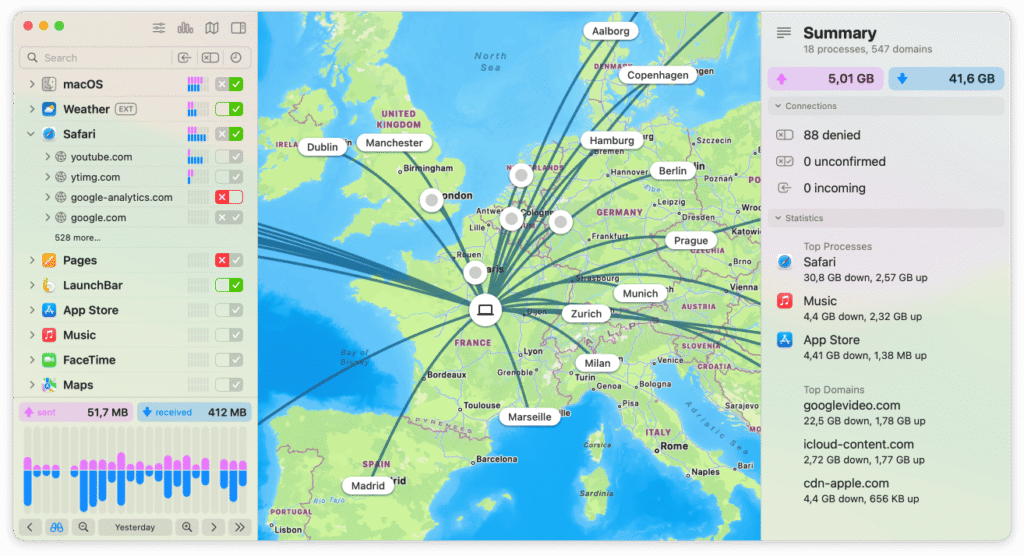
You may also see the precise URL that is being linked to. There is even a map view if you want a quick reminder of how many of your apps are silently linked in the background.
What’s New:
- Some of the many useful enhancements that come with Little Snitch 6 include DNS encryption.
- Simple access to blocklists, a redesigned interactive traffic chart, and a flexible new Control Center in the menu bar.
- New hierarchical grouping options in the connection list, new, entertaining sound notifications, and an overall updated user interface.
Features:
DNS Encryption: Use Little Snitch to encrypt your server name requests to shield your online activity from prying eyes.
Integrated Blocklists: Easily select from a professionally curated collection of blocklists. Install them with only one click to offer another layer of defense against unwanted connections.
Control Center in Menu Bar: You may easily check recent activity charts, recently blocked connections, and important network data from the menu bar.
Interactive Traffic Chart: To more effectively visualize and evaluate network activity, employ a redesigned, user-friendly real-time traffic chart.
Hierarchical Connection Grouping: Organize connections by application, domain, server, or country to gain further insight into network traffic.
Advanced Search and Filters: To locate certain connections or firewall rules fast, make use of enhanced search capabilities.
Release Notes of Little Snitch Portable:
- The daemon now aborts when a requested security feature cannot be activated to avoid the problem being ignored. Two new command-line options, –no_capability_sandbox and –no_file_sandbox, can be used to precisely disable security features as needed.
- A problem that prevented Landlock (the file sandbox) from turning on has been resolved.
- The SysVinit script now includes a section for OpenRC. However, OpenRC does not come with it pre-installed. The #!/bin/sh line must be removed for #!/sbin/openrc-run to take effect.
- The new configuration option ui_base_urls adds a check against cross-site request forgery to the web UI. If you have overridden web_ui.toml, consider adding this option to your override file.
How to Use?
Real-time traffic monitoring:
The program continuously updates a list of all incoming and outgoing network connections.
Silent Mode:
This feature allows users to temporarily disable all warnings and accept or refuse connections based on their previous selections.
Network Monitor:
This software provides a comprehensive overview of all network activity, including the amount of data used by each process and the number of connections established.
Automatic profile switching:
The software can switch between different network profiles automatically based on the user’s current location or the type of network they are connected to.
System Requirements:
- macOS 10.15 or later
- An Intel-based Mac with a 64-bit processor
- 50 MB of free hard drive space
Installation and configuration
- Download the installation from fcportables.net or the official website.
- Run the installer and select installation or portable mode.
- Complete setup by following the on-screen instructions.
- It will prompt you to choose scan settings and deliver a brief cleaning lesson after installation.
- Its first-time wizard lets customers configure settings for maximum efficiency right away.
Click to download Little Snitch Portable now.
Little Snitch Portable can be downloaded immediately from its homepage. Get it now!


