

FSNotes Portable is an open-source Markdown note-taking application. The application is maintained and supported by a thriving user and development community. The Apple App Store is the suggested distribution route; both the iOS and macOS versions are available for a small fee, even though FSNotes can be downloaded for free from GitHub.
FSNotes provides excellent Markdown support. The application’s numerous capabilities will appeal to power users. For example, the security features allow you to encrypt notes automatically when your machine goes to sleep. Furthermore, auto-save and archive features are included in Dropbox, iCloud, and Git. The search and tagging functions are perfect.
User Interface:
FSNotes, inspired by vintage programs like Notational Velocity, has a simple, elastic two-pane user interface that is optimized for speed and keyboard-centric navigation.
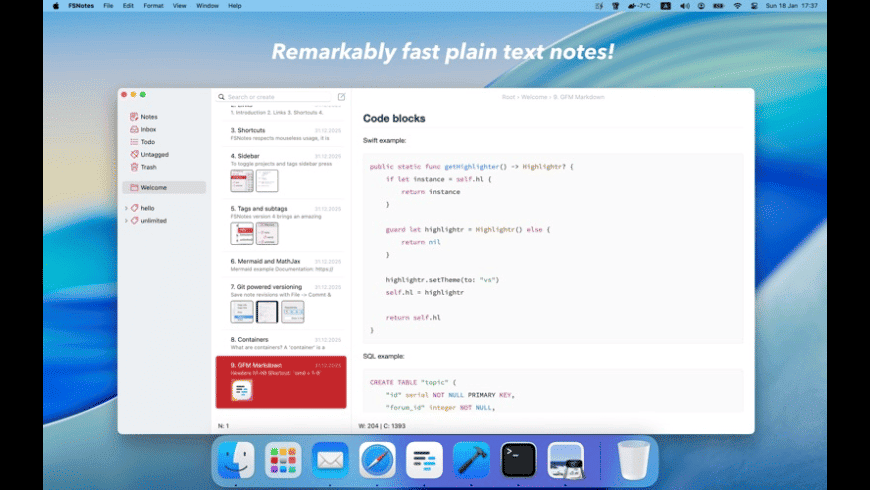
Its layout makes it easy to capture, search, and organize plain text and Markdown files without the need for mouse-intensive menus.
What’s New:
- Menus, toolbars, and the user interface as a whole have been updated to conform to current Apple design guidelines.
- The search feature on iOS has been moved to the bottom of the screen for easier one-handed access.
- The markdown editor is much faster thanks to the rewritten native Swift integration.
- You can attach documents and files directly to your notes on both macOS and iOS instead of just images.
Features:
- Markdown-first supports more than 10,000 plaintext files
- It is lightweight and quick, and it works seamlessly with more than 10,000 files
- It can be accessed from anywhere.
- synchronizes with iCloud Drive or Dropbox.
- Supports more than 170 programming languages.
- it supports cross-note links and has an elastic two-pane view
- It allows you to choose between vertical and horizontal layouts.
- It supports external editors and AES-256 encryption; supports Mermaid and MathJax; and has dark mode.
- It offers optional Git versioning and backups.
Release Notes of FSNotes for macOS
- Unexpected sort order by title (#1841)
- Code wrapping in preview mode (#1178)
- Mermaid text has low contrast in dark mode (#1068)
- Text formatted with a code span shows a black background in preview (#1780)
- Emoji line height (#1788)
- Header font-weights previewed in edit mode (#1764)
- Dark theme breaks after changing the notes’ color (#1435)
- FSNotes Note list preview blank on old entries (#1844)
How to Use?
keyboard-focused synchronization with iCloud
Global shortcuts (clipboard save/search)
Markdown and RTF markup (disk-stored plain/text and rich text files)
Markdown preview mode.
Two-pane view with elasticity (horizontal and vertical layout)
Lightweight and incredibly quick,
Open files with the Finder or external editors (changes smoothly sync with the user interface in real time).
You should either pin or unpin important notes.
Multiple-fold storage
Active-highlighted Markdown code sections in over 170 languages
System Requirements:
Hardware: The physical components of a machine, including the CPU clock speed, RAM capacity, available secondary storage (hard drive/SSD space), and display adapter.
Software: The operating system (OS) version, platform dependencies, necessary APIs, and required web browsers.
Other Elements: Peripheral devices, network bandwidth, or runtime environments. [1, 2, 3]
Installation and configuration
- Download the installation from fcportables.net or the official website.
- Run the installer and select installation or portable mode.
- Complete setup by following the on-screen instructions.
- It will prompt you to choose scan settings and deliver a brief cleaning lesson after installation.
- Its first-time wizard lets customers configure settings for maximum efficiency right away.
Click to download FSNotes Portable now.
FSNotes Portable for Mac can be downloaded immediately from its homepage. Get it now!


