

OkMap Desktop Portable can work with digital maps that you’ve bought or scanned on your computer screen using interactive software called OkMap. Additionally, OkMap may import vector data from the most widely used formats and DEM data relevant to height information.
OkMap Desktop can use these maps to plan your journeys by setting waypoints, routes, and tracks on your computer monitor and uploading this data to your GPS. OkMap automatically sets altitude data and computes travel times.
User Interface:
OkMap Desktop has a standard Windows application interface with a main map canvas surrounded by toolbars, menu bars, and unique data panels for managing GPS data.
You can also try these links:
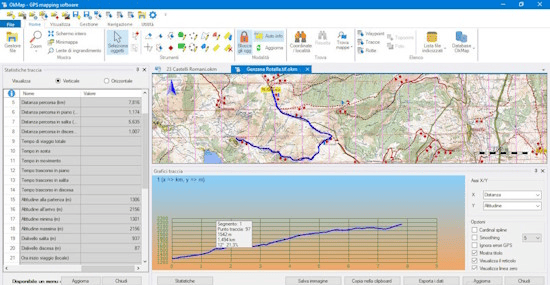
The primary menu bar, located at the top, provides access to file operations, display settings, map tools, routing, utilities, and preferences.
Toolbar: Just below the menu are quick-access icon buttons for selecting tools quickly, including sketching, zooming, panning, and attaching external devices.
Central Map Display: Loaded raster maps, online tile servers (Google, OpenStreetMap, and ESRI), or vector layers are overlaid with your active waypoints, routes, and tracks.
Data Lists and Panels: Side docking windows or tabs that offer current project data, elevation profile graphs, and item lists for locations, waypoints, and segments.
What’s New:
- There are now options for Earth curvature and atmospheric refraction in the distance/azimuth tools.
- The maximum distance at which visibility could be determined was fifty kilometers.
- The coordinate preference issues with the default datum and clear buttons have been resolved.
- File locking problems were fixed, and resource tracking for closed processes was cleaned up.
- The previous OziExplorer search conversion function was removed.
Features
- Use several cartographic projections to calibrate raster maps.
- Make your own digital maps by importing and creating forms.
- Build and maintain waypoints, routes, and tracks in GPX format.
- Download, store, and use Google Maps to automatically georeference.
- Autorouting, inverse geocoding, and geocoding techniques
- OKMap Desktop Stores and displays elevation using digital terrain models
- Download and upload data to and from GPS devices
- Use the NMEA protocol to navigate in real time.
- Tile maps for portable GPS
- Show Google Maps and Earth at the current map location.
- View your map in three dimensions by exchanging data with
- Use gpsgate.com to exchange data with the server.
- Acquire navigational information from distant GPS units.
- Transmit the current location to a distant OkMap server.
Release Notes for OkMap Desktop Portable:
- For several map servers, such as “OSM Refuges Info – Hiking” and “OSM OpenTopoMap,” URL updates and HTTP referer have been added. Bigger physical buttons to simplify the “Grid Setup” and “Map Setup” configurations.
- There are additional precision choices for air refraction and Earth curvature when calculating azimuth and distance.
- OkMap Desktop computer resources from terminated background tasks were appropriately released, and a number of file-locking issues were fixed.
System Requirements:
- Supported OS: Windows 11, Windows 10, Windows 8.1, Windows 7
- RAM (Memory): 2 GB RAM (4 GB recommended)
- Free Hard Disk Space: 2 GB or more
How to Use?
- Calibration and presentation of raster maps (more than 30 image formats)
- Display vector maps
- Display maps that incorporate both raster and vector data.
- The ability to open multiple maps simultaneously
- Nine of the most often used cartographic projections
- The database contains more than 500 predefined projections per area.
- Database with almost 300 data points
- Viewing 3D raster maps with Google Earth
- Control of map add-ons (comments, icons)
- Vectorial data management (point, multipoint, line, polygon)
- GPX data management (waypoints, tracks, and routes)
- Selecting several items with the mouse
- Context menu (right mouse)
- The auto-info function
- Features like autofit and zoom
- The moving map function has three variations.
- Customizing the toolbar to show a yes/no status bar and a toolbar with a yes/no option
Click to download OkMap Desktop Full Portable now.
OkMap Desktop 2026 Full Portable can be downloaded immediately from its homepage. Get it now!


