

TreeSize Professional Portable is a powerful and flexible disk space management application for Windows PCs and servers. This utility detects space hogs and facilitates the process of deduplicating data to free up disk space. TreeSize supports scanning local and network disks on Windows, Linux, Unix (via SSH), Amazon S3 cloud object storage, FTP, WebDAV, SharePoint servers, and even mobile devices such as smartphones.
TreeSize Professional software examines folders or disks and displays the sizes of all directories, subfolders, and files.
Clear charts help you track your disk space usage.
User Interface:
Stop guessing where your disk space has gone. TreeSize Professional offers basic visualization tools that help you make smarter storage management decisions, such as the following:
In Windows Explorer, a user-friendly UI allows for easy navigation.
Pie, bar, and tree map charts: For a clear view of disk utilization.
Detailed folder breakdowns: To identify space consumption.
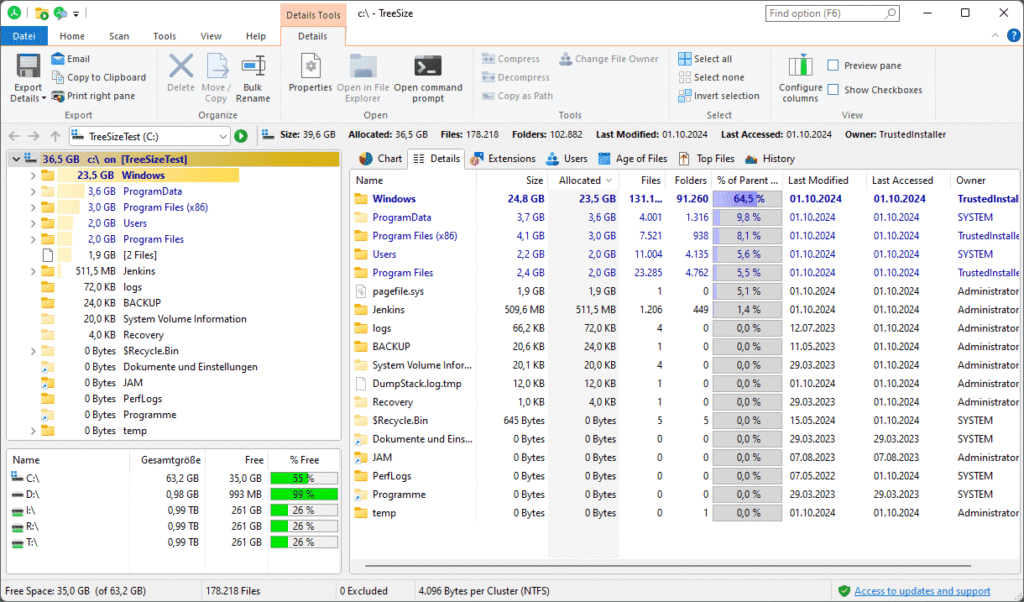
Whether you’re looking at local drives, network shares, or cloud storage, TreeSize Professional immediately discovers large files and hidden space hogs. With these insights, you can free up disk space more efficiently than ever before.
What’s New:
- Recent updates to TreeSize Professional (v9.x) offer significantly faster scan speeds (up to 50% faster).
- It supports scanning Google Drive and SharePoint authentication passkeys and better duplicate search filters.
- It also features optimized expert/simple settings and an enhanced first-run wizard.
Features
Versatile File Search
The TreeSize Professional File Search allows you to find, delete, or archive unnecessary files. It lets you look for specific files, like the largest or oldest, as well as temporary and internet files. The search criteria in the custom file search can be modified to your exact specifications. Files with specific patterns can be simply added or removed from scans.
Specialized Duplicate Search
There are several methods for identifying duplicate files. TreeSize analyzes MD5 or SHA256 checksums, or it combines file name, file size, and last modification date. Optionally, TreeSize will not count NTFS hardlinks as duplicate files, even if Windows treats them as independent files.
Detailed Statistics
It gives a list of detailed information on the supplied folder’s subfolders and files (including size, allocated disk space, percent of parent folder, date of last access, and last update date). TreeSize can generate a list of the top 100 largest files, as well as identify the file kinds and folders that take up the most disk space, making orientation easier.
Monitor Disk Space Development
Scan results can be saved in XML format and compared to current scans. Snapshots, or “photographs,” of disk space consumption at a specific point in time enable speedier comparisons. Windows creates snapshots on a regular basis, allowing you to load disk space consumption data from before TreeSize was installed on your system.
Release Notes of TreeSize Professional Portable
- TreeSize Professional, the most recent Windows 11 release, has removed OneDrive from the drive overview.
- A potential freeze when launching the software has been fixed.
- The potential freeze that occurred in the Jump List while launching TreeSize has been fixed.
- When an invalid path is entered into the search target dialog, the error message is no longer displayed.
- Subfolders are now properly zipped and decompressed.
- File operations and exports can now be performed in the file search for only the specified entries, even if no items are selected via the checkbox.
- The problem with individual pieces being unrecognizable at high screen scalings has been resolved.
- Errors found while scanning virtual roots are now correctly shown in the scan error list.
System Requirements:
Operating System: Windows 10, Windows 11, Windows Server 2016, Windows Server 2019, Windows Server 2022, or Windows Server 2025. [1]
Framework: .NET Framework 4.8 (or higher), which is automatically deployed during the software’s installation if not already present on the system. [1]
Disk Space: Minimal hard drive space for the application files (roughly 50 to 100 MB).
RAM & CPU: Standard requirements matching the modern Windows environment, though highly recommended to have 2GB+ of RAM when scanning multi-terabyte network shares, cloud servers, or massive directory trees.
Network/Cloud Capabilities: Supports all standard protocols (UNC paths, SMB, CIFS) and cloud analysis (Google Drive, Azure Blob, SharePoint), though these scans require corresponding read permissions. [1, 2, 3, 4, 5]
How to Use?
- TreeSize Professional line options enable automated and time-controlled scans, report production, and email results (via a user-friendly interface). (Available in Professional Edition).
- Multithreaded scans provide maximum speed by scanning each directory tree in several parallel operations.
- It offers full NTFS compatibility, including file-based compression, hardlinks, and alternate data streams (ADS).
- File paths with more than 255 characters will be processed successfully.
- Full network support: TreeSize scans an unlimited number of devices on a network.
Installation and configuration
- Download the installation from fcportables.net or the official website.
- Run the installer and select installation or portable mode.
- Complete setup by following the on-screen instructions.
- It will prompt you to choose scan settings and deliver a brief cleaning lesson after installation.
- Its first-time wizard lets customers configure settings for maximum efficiency right away.
Click to download TreeSize Professional Portable now.
TreeSize Professional Full Portable can be downloaded immediately from its homepage. Get it now!


