

XRECODE3 Portable is a versatile audio converter that supports a wide range of audio formats, including MP3, WAV, FLAC, DSD, and many more. It also lets you extract audio from most movie formats and music CDs. One of XRECODE3’s most distinguishing features is its ability to leverage the power of multi-core CPUs for faster, parallel conversion.
XRECODE3 has a built-in metadata editor with cover art support, as well as the ability to export and import metadata from other files. It can also aggregate input files into a single large audio file, create a CUE sheet, and support the LossyWav format.
User Interface:
XRECODE 3 excels at delivering a straightforward interface for quick and efficient audio file conversion across many formats, making it appropriate for both casual users and audio professionals.
It includes a fully functional, tabbed user interface (UI) that enables speedy audio conversion.
You can also try these links:
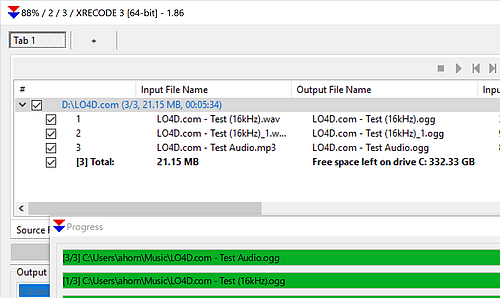
Despite its utilitarian and power-user-oriented appearance, it is completely resizable and task-specific. You may easily queue files with drag-and-drop, define alternative output formats, and perform batch actions with a single click.
What’s New:
- Native 64-bit support.
- XRECODE3 DSD/DST/DFF decoding is now supported (via files or SACD ISOs).
- Tracks from SACD ISO can now be exported as DFF or DST.
- There is now support for converting SACD/DST/DFF files to DFF/DST formats without transcoding.
- Added the ability to extract audio without transcoding.
- Added the option to merge multiple files into a single multi-channel file.
- All output formats now provide the option to split the file into individual tracks per channel.
- Added the option to merge files by folder.
- Output and metadata parameters are now output format-specific.
- The metadata settings have been modified.
- The metadata editor now supports multiple cover images.
Features
Broad Format Coverage:
XRECODE3 supports native encoding and decoding of FLAC, WAV, MP3, AAC, OGG, APE, and DSD (DSF, DFF, and SACD ISOs).
Video Audio Extraction:
Extracts audio tracks from formats such as FLV, AVI, and MOV while enabling multiple audio streams.
Multi-Threaded Batch Processing:
Uses multi-core processors for parallel conversion, allowing you to encode files into many formats concurrently using the “Multiple” output mode.
CD ripping and tagging:
Captures audio CDs with built-in metadata search (including cover art support), error correction, and CUE sheet production.
Advanced Splitting and Merging:
Splits files into chapters or embedded CUE sheets and can combine many files into a single huge multi-channel file.
High-Resolution Audio Support:
Includes built-in SoX and SoX-DSD resampling tools, as well as 24/32-bit audio file processing
Release Notes of XRECODE3 Portable:
- Pressing Ctrl+F8 will toggle the visibility of the status row, and the change will be preserved.
- Enhanced the internal library to process FFmpeg files (e.g., m2ts, dts, etc.), resulting in faster decoding.
- Updated to Wavpack 5.8.0.
- Transcode settings for WAV have been introduced. If you previously selected transcode options for FLAC, please re-enable them as they are now encoder-specific.
- Added “Copy file if the input sample rate is less than the output sample rate” options to the Wav/Flac/Transcode settings.
- Resolved the issue in which the TITLE of TRACK01 in the CUE file for the combined DSD files was not populated.
- Fixed the handling of some CUE files.
- Minor UI fixes.
System Requirements:
- Operating System: Windows 7, 8, 8.1, 10, or 11 (32 or 64-bit); Linux; or macOS.
- Processor: 1 GHz or faster (a multi-core processor is highly recommended for parallel conversions).
- RAM: 4 GB or more recommended.
- Hard Drive: 500 MB of available space for the installation and processing of temporary files.
- Sound Card: Any standard Windows-compatible sound card
How to Use?
- XRECODE3 is compatible with XP, Vista, Windows 7, Windows 8, and Windows 10, both 32 and 64-bit versions, as well as Wine.
- Parallel conversion is accomplished by leveraging the capabilities of multi-core CPUs.
- Chapters may be in mp4 or mka format.
- Built-in metadata editor that supports cover art.
- Supports LossyWav.
- Supports portable mode.
- Merge the input files into a single big audio file, then build a CUE sheet.
- The “Multiple” output mode allows you to convert to multiple formats at the same time.
- Multi-channel audio CDs are ripped and converted to the necessary format simultaneously.
- The user interface is informative and resizable, making it suitable for netbooks.
- Extracting audio from a variety of file types, including FLV, AVI, and MOV.
- Metadata can be exported and imported from external files.
Click to download XRECODE3 Full Window Portable now.
XRECODE3 2026 Full Portable for Windows can be downloaded immediately from its homepage. Get it now!


